Stop moving data
between tools
by hand.hand.
We connect your site to the CRM, payments and ops tools you already run — and automate the handoffs your team still does manually.
Most teams don't go looking for “integration services.” They go looking because one of these started costing real hours.
Someone is copy-pasting between tools
An order comes in, and a person retypes it into the CRM, the spreadsheet and the accounting tool. It works until they're on leave, or until they mistype a number nobody catches for a month.
An automation broke and nobody noticed
A connector quietly stopped firing after an API change. You found out from a customer, three weeks and an unknown number of dropped leads later.
A half-built setup you inherited
Someone started wiring things together — a freelancer, a former employee, you at 1am — and it half works. Nobody knows what runs, what it touches, or whether it's safe to turn off.
You don't want to learn Zapier yourself
You could work it out. You'd rather spend that week running the business and have someone hand you a system that already works, with a note explaining what to do when it doesn't.
These are the ones we work with most. If yours isn't here and it has an API, it's almost certainly still connectable — ask us.
Zapier
No-Code Automation
Make
Visual Workflows
n8n
Self-Hosted Automation
Stripe
Payments
HubSpot
CRM Sync
Shopify
Commerce API
Airtable
Ops Database
Google Sheets
Reporting
Zapier
No-Code Automation
Make
Visual Workflows
n8n
Self-Hosted Automation
Stripe
Payments
HubSpot
CRM Sync
Shopify
Commerce API
Airtable
Ops Database
Google Sheets
Reporting
Most projects are one of these, or two of them together. All of them start with an audit rather than a platform recommendation.
Site & Store Integrations
Connect WordPress or Shopify to the CRM, ERP, inventory or accounting system you already run — in both directions.
- ◆CRM sync (HubSpot, Zoho, Salesforce)
- ◆Inventory & order sync
- ◆Accounting (Xero, QuickBooks)
- ◆Two-way, not just export
Payments & Checkout Flows
Stripe, Razorpay and PayPal setup — plus the subscription, refund and reconciliation logic that starts after the first successful charge.
- ◆Gateway setup & testing
- ◆Subscriptions & recurring billing
- ◆Refunds & failed-payment recovery
- ◆Reconciliation into accounting
Workflow Automation
Replace the copy-paste between your tools with automations in Zapier, Make or n8n — or custom code where those run out of road.
- ◆Lead routing & qualification
- ◆Order & fulfilment handoffs
- ◆Slack and email alerting
- ◆Scheduled reports, no CSV exports
Custom API & Middleware
When no off-the-shelf connector exists, we build the endpoint, the sync, the retry logic and the error handling that keeps it honest.
- ◆Custom REST & webhook endpoints
- ◆Retry, queueing & rate limits
- ◆Field mapping & transformation
- ◆Failure alerts from day one
Automation work goes wrong in predictable ways. This order is what stops your real customers being the test data.

Process Audit
We map what your team does by hand, then work out what's worth automating.

Integration Plan
Systems, data direction, what happens on failure, and the monthly running cost.

Build in Staging
Everything built against a sandbox or dev store first — never against live orders.

Test & Go Live
Refunds, partial stock, duplicates and timeouts tested, then a switch with rollback ready.

Monitor & Maintain
Failure alerts from day one, plus scheduled checks that an API change hasn't broken it.
Products where the integration work is the product — messaging platforms, operations software, and subscription commerce.
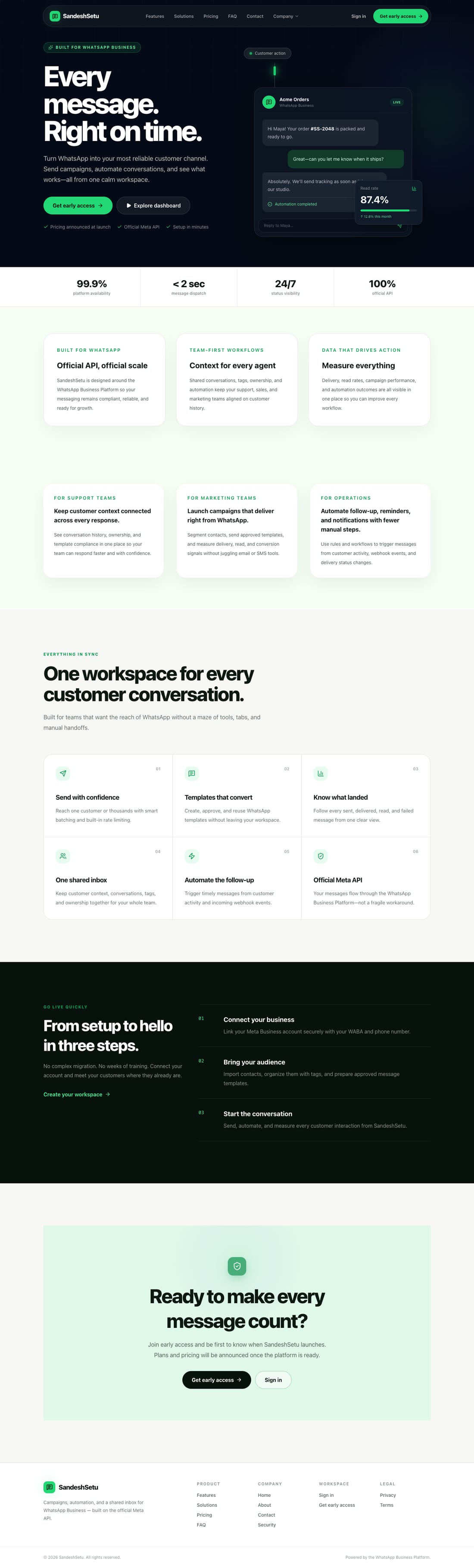
SandeshSetu
A WhatsApp Business platform — campaigns, automations and a shared inbox in one workspace, wrapped in a crisp product-marketing site.
- Bold, modern product narrative
- Interactive dashboard visuals
- Early-access lead capture
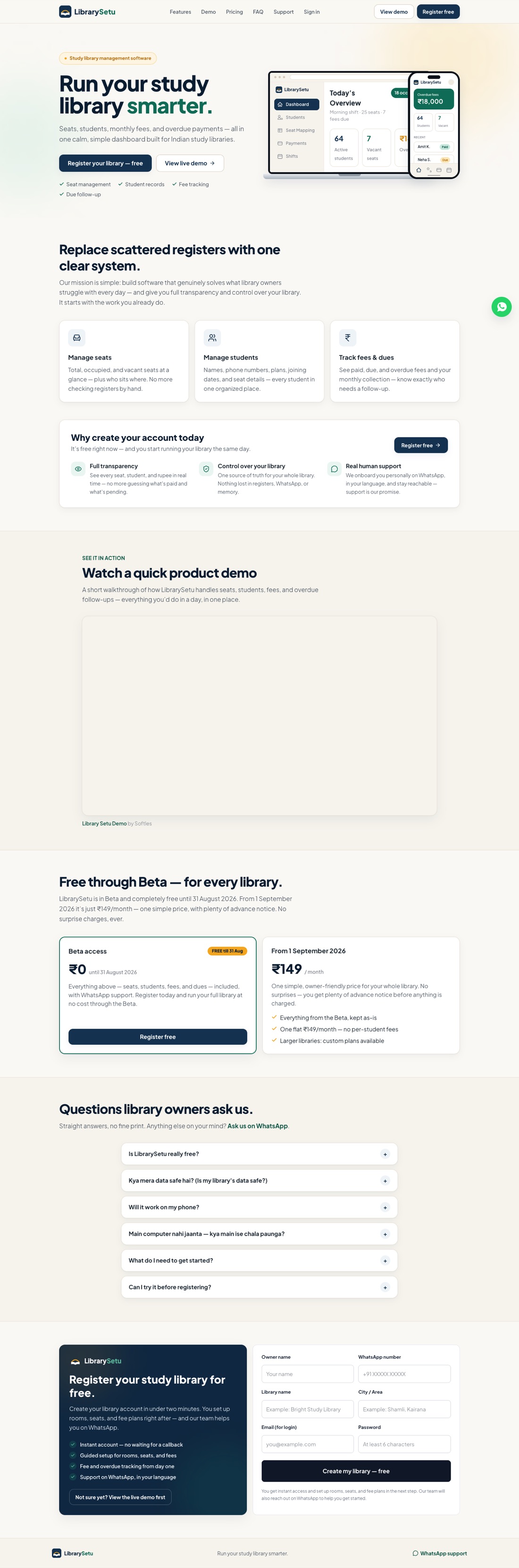
LibrarySetu
Study-library management software — seats, students, fees and dues in one calm dashboard built for Indian study libraries.
- Clear product storytelling
- Confident SaaS visual system
- Fast and responsive on every device

Brunswick Fur Food
Fresh, human-grade dog food for Melbourne — a Shopify store rebuilt to turn product quality into trust and repeat orders.
- Conversion-focused custom theme
- Streamlined subscription & trial flow
- Mobile-first product discovery
Anyone can wire two apps together on a good day. These are the habits that decide what happens on a bad one.
Your live checkout is never the test environment
Every build runs against a development store or sandbox account first. Real customers and real money only meet the automation once the ugly edge cases already passed.
Sandbox first, alwaysBroken automations tell you
Failure alerts and retry logic ship with every build — so a dead sync doesn't quietly drop leads for weeks.
We'll tell you when no-code is wrong
Per-task pricing is cheap until your volume climbs. We run the numbers on your actual usage before recommending a platform.
You own the accounts
Automations live in your Zapier, Make or n8n workspace under your credentials. Nothing is hostage to ours.
A written map of what runs
One page per project: what triggers each automation, what it touches, and what to do when it fails.
We work on the platform too
A theme update or plugin change doesn't need a second vendor and a three-way email thread — we build the WordPress and Shopify side as well as the wiring between them.
One team, both sidesStraight answers on platforms, cost drivers and what happens when something breaks.
Still have a question?
We reply fast — usually within a few hours on WhatsApp, always within a day by email.
Talk to usAn integration connects two systems so they share data without anyone moving it; an automation runs a task without a person doing it. Most real projects need both, which is why the terms get used interchangeably — the same platforms usually do both jobs.
It depends on your volume and how much branching logic you need. No-code is faster and cheaper to start, but per-task pricing and step limits make high-volume or heavily conditional workflows cheaper to build in code, and n8n can be self-hosted to remove per-task fees entirely. We recommend after seeing your actual numbers, not before.
It varies widely with scope, so we quote against your specific systems rather than a menu price. A single straightforward connection is a small piece of work; connecting a store to several platforms with two-way sync, error handling and reconciliation is a multi-week project. The cost drivers are how many systems, whether data flows one way or both, and how many edge cases have to be handled.
Simple automations typically ship in days. A multi-system integration is usually two to four weeks of build plus testing, and a first large integration with full discovery, staged rollout and handover can run considerably longer. We give you a stage-by-stage timeline after the audit.
APIs change and third-party services go down — the real question is whether you find out. Every build we ship includes failure alerts and a retry or queue design, so a broken sync surfaces immediately instead of silently dropping records. Retainer clients get us fixing it; everyone else gets a documented runbook for their own team.
Yes — platform subscriptions are billed by those vendors directly to your own account, and we build inside your workspace rather than ours. Self-hosted n8n avoids per-task fees but adds a hosting cost instead; we'll show you the monthly running cost for each option before you commit.
Yes, and it's a common starting point. We audit what's already there, keep what works, document it, and rebuild only the parts that are actually broken — inheriting a half-finished setup is usually cheaper than starting over.
Data moves directly between your own accounts, not through ours. We use scoped API keys with least-privilege access, credentials stay in your workspace, and we can sign an NDA and data-processing agreement. We don't claim certifications we don't hold — if you need a specific compliance standard, tell us early so we can scope it properly.
Bring us the manual process, the half-finished automation, or the two systems that refuse to talk. We'll map what's connectable, what it would cost to run each month, and whether it's even worth automating — before you commit to anything.